Disclaimer: The following blog post aims to explain how Tandem’s Control-IQ algorithm help adjust the insulin delivery on a Control-IQ enabled Tandem t:slim X2 pump. Everything is written entirely by myself, has not been verified by any external party and could therefore contain errors. Always consult the user manual as well as your diabetes team before using the Control-IQ system.
The basic insulin pump vs. the dream
In its simplest form, an insulin pump is just a mechanical version of an insulin pen that is constantly connected to your body. It administers insulin automatically at regular intervals according to a schedule pre-programmed by you. This is the so-called basal dose. And whenever you need to, just as with a regular insulin pen, you can of course also make a manual injection, or in insulin pump lingo, take a bolus.
So on one end, you have the basic insulin pump I just described. On the other end, there’s the dream of a completely self-sustained system. A system that relieves people with diabetes from the life-long struggle to constantly manage the disease and instead does everything for you automatically. Basically, an artificial pancreas that the immune system can’t attack and destroy.
While we are yet to get a consumer friendly and safe fully closed-loop system that does it all, so-called hybrid closed loop systems are in full bloom. Those are systems that are semi-automatic. They require some form of intervention from the user, but also have some of the basics done automatically. One such system that, at the time of this writing, is gaining a lot of traction is Tandem’s t:slim X2 insulin pump with Control-IQ. This article is dedicated entirely to explaining how that system works.
Control-IQ and me

In December 2020 I received the Control-IQ firmware update for my insulin pump, and I immediately fell in love. As a type 1 diabetic you take an enormous amount of decisions related to your disease every single day. After living with the disease for 12+ years, Control-IQ suddenly made that burden a tad lighter. It’s a bit like having a little diabetes assistant in your pocket, constantly trying to help you out. Amazing!
Almost two years later, and here I am. My values have improved, I feel like I don’t need to spend as much time as I used to on my diabetes and I also feel safer. With Control-IQ relentlessly working in my pocket the risks of me getting a hypo- or hyperglycemic event is reduced, and that feels great.
Working with diabetes myself, I speak to many people about the disease and the gear we use to treat it. And what I’ve noticed is that sometimes people tend to wait a bit before they finally take the plunge on Control-IQ and upgrade their pump. There’s a feeling of not being a 100% sure what it’s about, that they need to read up on it first and somehow put in a lot of work to completely understand it. That’s exactly where this article comes into the picture: in the coming sections below, I attempt to explain how it works in the most simple way possible. I’ve gone through the manual, taken the important parts and phrased them in my own way so that you can hopefully understand the basics with less work. Of course, before starting to use Control-IQ you should still always consult the manual and your diabetes team, but maybe this article can help you along the way.
The system
Before we jump into Control-IQ itself, we must begin by understanding its different parts. Luckily, it’s quite simple. For Control-IQ to work, three parts are required:
- Tandem t:slim X2 insulin pump
- Dexcom G6 Continuous Glucose Monitoring (CGM) system
- The Control-IQ algorithm itself. This is part of firmware 7.4 or later for the Tandem pump.
Control-IQ can be thought of as the brain in the system. It combines data from both the insulin pump and the CGM system to ultimately adjust insulin delivery automatically for you.
Four levers

Control-IQ is an algorithm and that word understandable makes many people uncertain. What is an algorithm exactly? Well, here’s one definition I found
a process or set of rules to be followed in calculations or other problem-solving operations
Translated to this context, Control-IQ is a set of rules the insulin pump follows to solve the problem of regulating your insulin delivery accurately. Before we get to what rules Control-IQ acts according to, you should first know how Control-IQ adjusts insulin delivery, or rather, what levers the Control-IQ algorithm has at its disposal. Control-IQ can:
- Increase the basal insulin delivery
- Decrease the basal insulin delivery
- Suspend the basal insulin delivery completely (basically a variant of #2).
- Inject an auto-correction bolus
That’s it! Suffice to say, there are of course safety measures bulit into Control-IQ so that these levers can only be pulled to a certain extent. For now I’ll refer to the user manual for these.
Now that we know the four levers Control-IQ has at its disposal, let’s dig into the meat of the algorithm: the set of rules it follows.
Five rules

Control-IQ’s main objective is to keep your glucose within a certain target range, a form of sweet spot. If that is somehow not possible, the main objective instead becomes to prevent your glucose from going too high or too low.
Exactly what this target range is as well as what is to be considered “too low” can be configured by the user to some extent, but more on that later. For now it’s enough to know there is a target range as well as the concept of too low and too high glucose value.
To keep your glucose value within the target range, Control-IQ predicts what your glucose value will be in 30 minutes. Based on this as well as your active personal profile, when under normal operation, the algorithm then acts according to the following five rules:
- If your glucose value is predicted to be below the target range, the basal insulin delivery is decreased.
- If your glucose value is predicted to be above the target range, the basal insulin delivery is increased.
- If your glucose value is predicted to be low, the basal insulin delivery is suspended.
- If your glucose value is predicted to be high, an auto-correction bolus is delivered.
- If your glucose value is predicted to be within the target rage, the pre-programmed basal rate of the active profile is maintained.
Three modes of operation
Normal mode
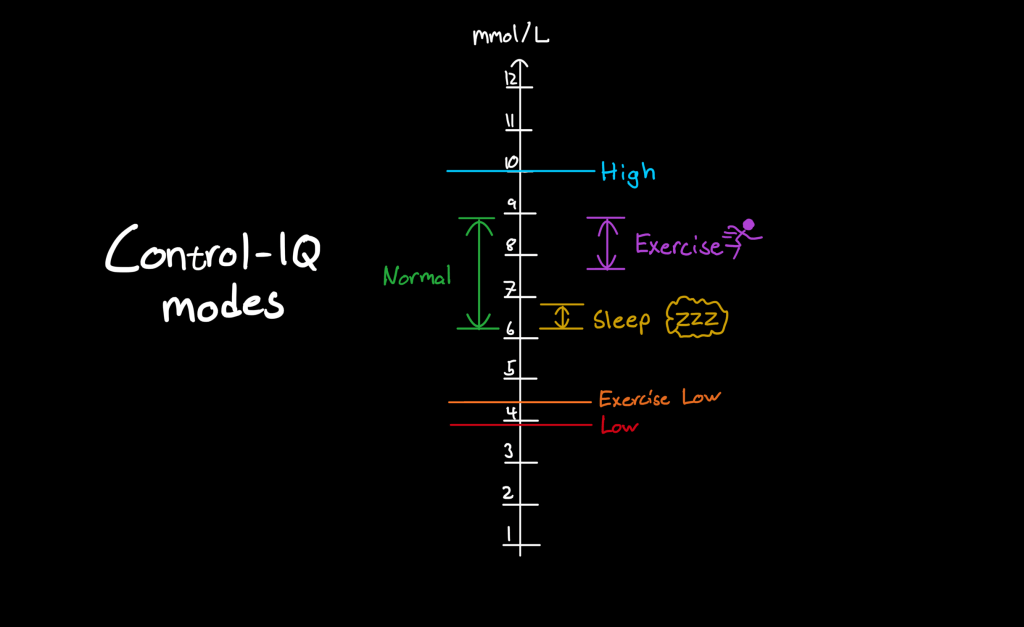
In the previous section, the normal mode of operation was described. In normal mode, the target range is fixed at 6.25 mmol/L – 8.9 mmol/L. Low glucose is considered to be below 3.9 mmol/L and high glucose above 10 mmol/L. The normal mode is designed to cover the needs for the majority of the waking part of your day. As you might have guessed though, there are a few other scenarios where this target range and high/low thresholds might not be ideal. Enter exercise and sleep mode.
🏃♂️💨 Exercise mode
Meant for exercise when you typically want to have a slightly higher target range to have some room for intense physical activity, this mode differs from normal mode in the following ways:
- The target range is fixed at 7.9 mmol/L – 8.9 mmol/L.
- The low glucose threshold is 4.4 mmol/L.
In other words, the target range for exercise mode is slightly higher, but also more narrow. And the basal insulin delivery will get suspended slightly earlier compared to normal mode.
Exercise mode can be activated manually by the user whenever needed.
💤 Sleep mode
While asleep the amount of physical activity is close to zero. This allows for a lower, tighter target range than when awake. Sleep mode differs from normal mode in the following ways:
- The target range is fixed at 6.25 mmol/L – 6.7 mmol/L.
- Auto-correction boluses are disabled.
This means that with sleep mode enabled, Control-IQ will aim to keep your glucose value slightly lower than it would in normal mode. Also, it won’t give you any auto-correction boluses, thus lessening the risk for hypos while asleep.
Sleep mode can be activated manually by the user whenever needed, but also scheduled to start at specific week days and times of day.
A graphical comparison of the modes
For the more visually oriented people out there, here’s a non-scientific graphic comparison of the three modes, their target ranges and high/low thresholds. Sleep mode has the most narrow target range, followed by exercise mode that has a slightly wider target range that also sits higher on the glucose value ladder. “High glucose” is the same across all modes, low is the same in normal and sleep mode but slightly higher for when in exercise mode.
Real-world example
Congratulations! If you’ve made it this far you should now the basics of Control-IQ. I’ll list some more rapid-fire facts about how it works at the end of this article, but first I’d like to show you a visualization of Control-IQ at work. Here’s a graph for my own data, taken from Glooko.com:

There’s a lot going on in this screenshot. For this context though, the most important parts are the “Glucose” and “Basal Rate” sections. More specifically, what’s interesting here is how and when Control-IQ modifies the otherwise pre-programmed basal rate in relation to the glucose values.
In Glooko, the regular basal rate is always shown as a purple solid line. For example, there’s a long stretch of 1.3 U/h between ~6:30 and 12:30 where Control-IQ hasn’t interfered.
Deviations from the pre-programmed basal rate, that is, when Control-IQ has decided to increase or decrease the basal rate automatically, is visualized as purple bars. Running along those bars is a gray line showing what the pre-programmed basal rate was for that period. For example, at roughly 21:00 in the evening the glucose value was steadily increasing. Control-IQ accurately predicted my glucose value would soon be outside of the target range and therefore applied a temporary increase of the basal rate. Where I normally had 0.9 U/h, Control-IQ incrementally increased the rate to ~3.5U/h. Without this, I likely would have gotten a much higher glucose value for this part of the day than I ended up with here.
Control-IQ also tried preventing a low glucose value several times throughout the day. For example, around 15:00, the glucose value was on a steady decline. Control-IQ then predicted the value to be lower than 3.9 mmol/L within 30 minutes and, as a countermeasure, completely suspended the basal rate for some time. This can be seen as full, red vertical bars in the basal rate section of the graph.
Finally, there are a couple of examples of the last tool in Control-IQs toolbox: the auto correction bolus. At around 16:00, the glucose value that had previously been declining suddenly made a rapid turn and instead increased quickly. Here, Control-IQ predicted the glucose value to be above 10 mmol/L in 30 minutes and therefore injected an automatic correction bolus. Unbeknownst to this I happily continued my afternoon and Control-IQ had once again probably saved my glucose value from going way too high. Magic! 🪄
For those of you interested in the various modes Control-IQ can operate under, pay attention to the “System” section at the bottom of the graph. There you can observe that I used sleep mode during the night and had a brief exercise in the morning. During these time periods, Control-IQ worked under slightly different target ranges and rules, as per the various modes I described earlier.
ℹ️ Additional info about Control-IQ
In writing this article I used the user manual for Tandem t:slim X2 pumps with firmware 7.6 as a reference. While going through the manual I made sure to highlight some important aspects of Control-IQ. Here’s a non-exhaustive list of those, in no particular order:
- When Control-IQ is enabled but for some reason no CGM readings are available (sensor warmup, connection error etc.), the maximum basal rate is 3 U/h. If you need more than that in these situations, Control-IQ has to be turned off.
- Before activating a temporary basal rate, Control-IQ must be turned off.
- Control-IQ stops any increase of basal rate that it has made if the maximum rate of insulin delivery has been reached. This is a value that is calculated based on correction factor (ISF), insulin on board as well as estimated total daily insulin vs. maximum daily insulin configured for Control-IQ.
- The target glucose value for any auto correction boluses is always 6.1 mmol/L.
- There can only ever be one auto correction bolus per hour, at most. Furthermore, correction boluses will not be delivered within 60 minutes of a start/cancellation/completion of either an automatic or regular, manual bolus. So if you just ate some food, took a manual bolus and then wonder why Control-IQ is not responding to a rapid increase in your glucose value, that’s the reason.
- An auto correction bolus can never be larger than 6 units.
- Required settings for Control-IQ to be able to operate are:
- Basal rate
- Correction factor
- Carb Ratio
- Target BG
- Carbohydrates enabled
- Weight
- Total Daily Insulin
 Diabetes Simon